Gladio Mori Move Editor Tutorial
Build attacks, blocks, and movement with keyframes—then take them into the arena.
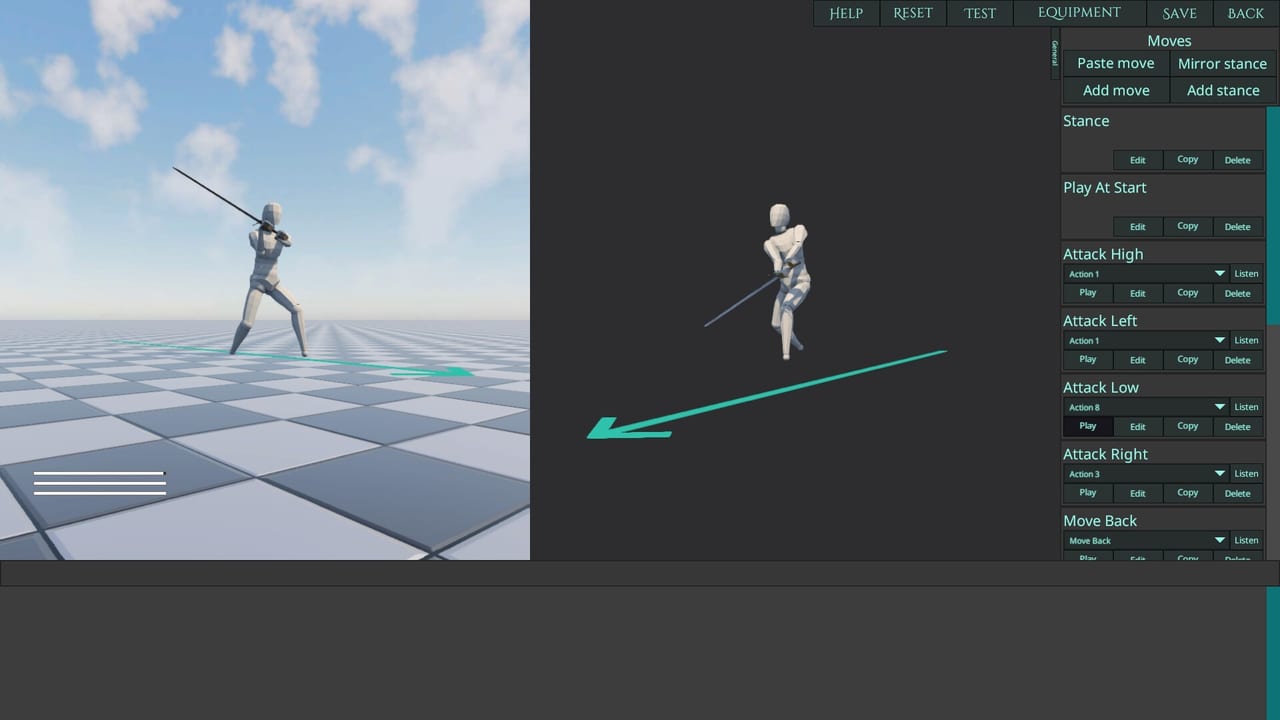
The Move Editor is why Gladio Mori feels like a creative physics sandbox instead of a fixed-movelist fighter. You pose the body over time, bind inputs, and ship movesets that other players can browse, remix, and fear. This guide covers a practical workflow for 1.0 on PC and consoles, including the in-game tutorial features, controller input icons, and community gallery habits.
New players should finish Getting Started and a few Campaign fights before publishing. Creators still need clean controls so listen-binds match how they actually play.
What you can author
Inside the editor you craft pieces of a full fighting identity:
- Attacks —?swings, thrusts, kicks, grapples, cinematic nonsense that somehow works
- Blocks / defensive motions —?postures that present armor and reduce stupid openings
- Movement —?approaches, pivots, and recovery paths that fit your weapon’s reach
You are not limited to polite historical forms. Community clips include rolling takedowns, pins, and acrobatic nonsense. The organ damage system still applies: a beautiful spin that offers your neck is still a gift to the opponent.
Keyframes, timing, and physics dolls
Think in keyframes and transitions (the old “tween—?mental model). Each key pose tells the physics character where limbs should be driven over time. Tight spacing between poses creates snappy strikes; wide spacing creates telegraphed commitments. Your job is to balance readability for yourself with opacity for opponents.
Workflow that keeps sets usable:
- Duplicate a stock-like move as a template
- Adjust end pose first so the weapon edge finishes where you intend
- Work backward into windup so the path clears your own body
- Test against AI before any Creative lobby
- Watch a replay of the move landing on an unprotected joint
Edge alignment matters because damage follows blade lines. If the steel’s path never crosses an artery or muscle you care about, the animation is theater.
Layers and input types
The editor can update a move’s layer automatically when input type changes. Use that. If you switch a move from a face-button context to a shoulder-modifier context, confirm the layer still matches your mental model of the moveset. Controller input icons in the UI help you keep documentation honest when you share sets.
Listen / bind capture should be tested after rebinds. If “listen—?fails in a corner case, re-enter the bind screen, confirm no conflicts, and try again—do not assume the move recorded the gesture you meant.
Building a coherent moveset
A moveset is more than five cool attacks. Aim for:
- A neutral poke that is safe enough to learn spacing
- A commit strike that threatens vitals or limbs when they whiff
- A defense option that presents covered planes
- A panic / reset movement that breaks bad positions
- Clear branches that still work if a hand or arm is gone
Remember dismemberment. If every finisher requires two hands and a cartwheel, you will blank after the first serious cut. Author at least one ugly, short, one-armed option.
Community gallery and remixing
Not everyone wants to animate. Browse the community moveset gallery, try sets in Classic-adjacent practice or Creative, and remix individual moves into something yours. Credit culture matters in Discord and workshop spaces even when the game lets you mash pieces together.
When you publish:
- Name clearly (weapon family + style + version)
- Note intended mode (Creative vs anything-goes Limitless)
- Avoid packing exploits that only work because of a known physics quirk you refuse to document
For wider content (weapons, arenas, skins), see Mods & mod.io. Movesets and mods often travel together in friend groups—keep versions aligned before multiplayer nights.
Testing protocol
- Solo mannequin / AI —?does the path hit where you think?
- Campaign bout —?can you land it under mild pressure?
- Local split-screen —?does a friend read and punish it immediately?
- Creative lobby —?does it survive real chaos?
- Limitless —?if strength is boosted, did your move become an accidental suicide angle?
Record failures. The replay free camera is a design tool, not only a highlight reel.
Console and cross-play notes
Move editing and gallery access matter on consoles as well as Steam. Cross-play lobbies mean a PS5 creator and a PC host can share the same Creative ruleset. Still verify that everyone loaded the intended moveset revision before tournament checkboxes start counting rounds.
Common creator mistakes
- Publishing before checking self-intersection and accidental auto-hits
- Ignoring stamina / recovery reality so the move only works once
- Designing exclusively for highlight clips instead of repeatable neutral
- Forgetting armor coverage—your thrust into plate is a free punish
- Binding the set to inputs you cannot hit consistently under bleed pressure
Learning path
Week 1: edit timings on one stock attack. Week 2: add a custom movement escape. Week 3: publish a small set and take feedback in the official Discord. Cross-link your practice with the tier list only after the set is stable—meta talk is useless if your finisher whiffs the thigh.
The mid-article video walks the editor visually; use it alongside this checklist the first time you open the tools.
Master the Move Editor and Gladio Mori becomes a platform for styles, not just a roster of ~34 weapons. Ignore fundamentals and you will invent beautiful ways to present your arteries to strangers.
Frequently Asked Questions
Quick answers to the most common Gladio Mori questions.
Do I need the Move Editor to enjoy Gladio Mori?
No. You can play Campaign and Classic with stock tools. The editor and gallery unlock Creative expression and much of the game’s long-term identity.
Can I mix moves from other players?
Yes. The community gallery supports discovering and remixing moves into a moveset that fits your weapon and style.
Why did my move’s layer change after I edited inputs?
The editor can update a move’s layer automatically when input type changes. Recheck the layer so the moveset hierarchy still matches your plan.
Should I test in Limitless first?
Test in AI and normal Creative first. Limitless boosts strength and can exaggerate both strengths and suicidal angles.
Where should I share finished movesets?
Publish in-game where supported and discuss balance or tutorials in the official Discord community.